> For the complete documentation index, see [llms.txt](https://docs.justpush.io/introduction/llms.txt). Markdown versions of documentation pages are available by appending `.md` to page URLs; this page is available as [Markdown](https://docs.justpush.io/introduction/objects/messages/title.md).
# Title
Think of the `title` as your message’s opening act. It sets the stage and gives context before the recipient even glances at the actual message. If you leave it out, don’t worry—JustPush.io will automatically use the app’s name instead (but come on, you can do better than that).
A great title is short, punchy, and informative. Something like:
✅ `🚨 Server Down! Panic Mode Activated`\
✅ `🔥 New Order #12345 – Time to Celebrate`\
✅ `🤖 Your Automation Just Did a Thing`
Avoid titles like:
❌ `"Message"` (Wow, inspiring.)\
❌ `"Notification"` (We gathered that already.)\
❌ `"Important Update"` (Important to *who*?)
#### Requirements
Attribute
Data Type
Validation Criteria
title
string
max 255 characters
{% hint style="info" %}
If a push message includes only a title, the body will default to "*Empty.*"
{% endhint %}
#### Example Request
```bash
curl -X "POST" "https://api.justpush.io/messages" \
-H 'Content-Type: text/plain; charset=utf-8' \
-d $'{
"user": "<< USER KEY >>",
"title": "A simple title"
}'
```
#### Mobile App
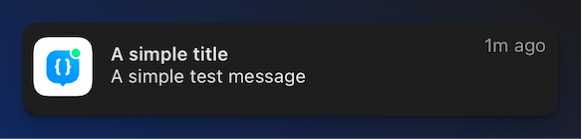
A message with only a title will look like this.
A simple message with a title
***
#### Frequently Asked Questions
Is the title required?
Nope! `title` is entirely optional. Send us an empty payload and we won't complain—JustPush.io will quietly step in with "JustPush.io" as the title so your message still shows up looking presentable.
How long can the title be?
At maximum it can be `255` characters. But honestly, if you’re writing a novel in the title, you might need to rethink your approach.
Can I use emojis?
Absolutely! Emojis make everything better. Just don’t overdo it. `"🔥🔥🔥🔥🔥🔥🔥🔥🔥🔥🔥🔥🔥🔥🔥🔥"` might grab attention, but it won’t make you any friends.
What if I forget to set a title?
Nothing breaks, but your message might lack context. Your future self might not appreciate the mystery.
***
## Agent Instructions: Querying This Documentation
If you need additional information that is not directly available in this page, you can query the documentation dynamically by asking a question.
Perform an HTTP GET request on the current page URL with the `ask` query parameter:
```
GET https://docs.justpush.io/introduction/objects/messages/title.md?ask=
```
The question should be specific, self-contained, and written in natural language. The response will contain a direct answer to the question and relevant excerpts and sources from the documentation.
Use this mechanism when the answer is not explicitly present in the current page, you need clarification or additional context, or you want to retrieve related documentation sections.